Pages

Showing posts with label IDM. Show all posts

Thursday, December 20, 2012

UserManager : Misc (Lock/Unlock/Disable/Enable)

Now lets look at the other important functionalities provided by the UserManager class.

1) Code

public void misc(OIMClient oimclient){
UserManager usrMgr = oimclient.getService(UserManager.class);
try {
usrMgr.lock("65", true, true);
usrMgr.unlock("65", false);
usrMgr.disable("65", false);
usrMgr.enable("65", false);
} catch (ValidationFailedException e) {
// TODO Auto-generated catch block
e.printStackTrace();
} catch (UserLockException e) {
// TODO Auto-generated catch block
e.printStackTrace();
} catch (NoSuchUserException e) {
// TODO Auto-generated catch block
e.printStackTrace();
} catch (AccessDeniedException e) {
// TODO Auto-generated catch block
e.printStackTrace();
} catch (UserUnlockException e) {
// TODO Auto-generated catch block
e.printStackTrace();
} catch (UserDisableException e) {
// TODO Auto-generated catch block
e.printStackTrace();
} catch (UserEnableException e) {
// TODO Auto-generated catch block
e.printStackTrace();
}
}

2) Result

User is locked/unlocked/disabled/enabled as expected

3) JavaDoc

You can find more information about the UserManager class and its methods in the javadoc link.

Wednesday, December 19, 2012

UserManager : Delete User

1) Code

public void deleteUser(OIMClient oimclient){
UserManager usrMgr = oimclient.getService(UserManager.class);
try {
usrMgr.delete("65", false); // False because we used usr_key. Use true if using User Login
} catch (ValidationFailedException e) {
// TODO Auto-generated catch block
e.printStackTrace();
} catch (UserDeleteException e) {
// TODO Auto-generated catch block
e.printStackTrace();
} catch (NoSuchUserException e) {
// TODO Auto-generated catch block
e.printStackTrace();
} catch (AccessDeniedException e) {
// TODO Auto-generated catch block
e.printStackTrace();
}
}

2) Result

User is marked deleted.

3) Alternate methods

    delete(java.util.ArrayList userIDs, boolean isUserLogin)

For bulk delete

delete(java.lanj.String attributeName, java.lang.Object attributeValue)

For delete based on condition.


Tuesday, December 18, 2012

UserManager : Modify User Code

We can now look into modifying existing users.

1) Code

public void modifyUser(OIMClient oimclient){
UserManager usrMgr = oimclient.getService(UserManager.class);
User user = new User("65"); //Pass the user_key while creating [Can be obtained using a search]
user.setAttribute("First Name", "APIUser_FName");
user.setAttribute("Last Name", "APIUser_LName");
try {
usrMgr.modify(user);
} catch (ValidationFailedException e) {
// TODO Auto-generated catch block
e.printStackTrace();
} catch (UserModifyException e) {
// TODO Auto-generated catch block
e.printStackTrace();
} catch (NoSuchUserException e) {
// TODO Auto-generated catch block
e.printStackTrace();
} catch (AccessDeniedException e) {
// TODO Auto-generated catch block
e.printStackTrace();
}
}

2) Result


3) Alternates

usrMgr.modify("Email", "APIUSER1@MAIL.COM", user);

Where the first two parameters are the search condition. All users who satisfy the condition will be modified.


modify(java.util.ArrayList userIDs, java.util.HashMap args, boolean isUserLogin)

We can pass a list of userIds to be modified. 
The hashmap contains the attribute names and values to be modified.
isUserLogin should be set to true if the userIds list contains the User Logins, else use false if they are user key values.


Monday, December 17, 2012

UserManager : Search User Code

Now that we have created users, we can try to search for users.

1) Code

public void searchUser(OIMClient oimclient){
UserManager usrMgr = oimclient.getService(UserManager.class);
Set retAttrs = new HashSet();
retAttrs.add("First Name");
retAttrs.add("Last Name");
retAttrs.add("User Login");
SearchCriteria sc = new SearchCriteria("First Name", "*",Operator.EQUAL);  // Search can use wildcards
List<oracle.iam.identity.usermgmt.vo.User> userList;
try {
userList = usrMgr.search(sc, retAttrs, null);
for(oracle.iam.identity.usermgmt.vo.User user: userList){
System.out.println(user.getAttributes());
}
} catch (UserSearchException e) {
// TODO Auto-generated catch block
e.printStackTrace();
} catch (AccessDeniedException e) {
// TODO Auto-generated catch block
e.printStackTrace();
}
}

2) Result

Connected
{usr_key=1, User Login=XELSYSADM, Last Name=Administrator, First Name=System}
{usr_key=3, User Login=WEBLOGIC, Last Name=WEBLOGIC, First Name=WEBLOGIC}
{usr_key=4, User Login=OIMINTERNAL, Last Name=OIMINTERNAL, First Name=OIMINTERNAL}
{usr_key=65, User Login=APIUSER1@MAIL.COM, Last Name=APIUser1, First Name=APIUser1}
{usr_key=48, User Login=FNAME1_LNAME1@MAIL.COM, Last Name=LName123, First Name=FName123}
{usr_key=66, User Login=APIUSER0.APIUSER0@ORACLE.COM, Last Name=APIUser0, First Name=APIUser0}
{usr_key=67, User Login=APIUSER@MAIL.COM, Last Name=APIUser, First Name=APIUser}
Disconnected

3) Complex SearchCriteria

If there is a need to create complex searchCriteria, there is a way to combine searchCriteria as below:

SearchCriteria sc1 = new SearchCriteria("First Name", "*",Operator.EQUAL);
SearchCriteria sc2 = new SearchCriteria("Last Name", "*",Operator.EQUAL);
SearchCriteria sc = new SearchCriteria(sc1, sc2, Operator.AND);

UserManager : Create User Code

Lets start into more mainstream stuff.

We will look at the UserManager class which is used for the User operations. This is similar in operation with the tcUserOperationsIntf class, which is still present in 11G.

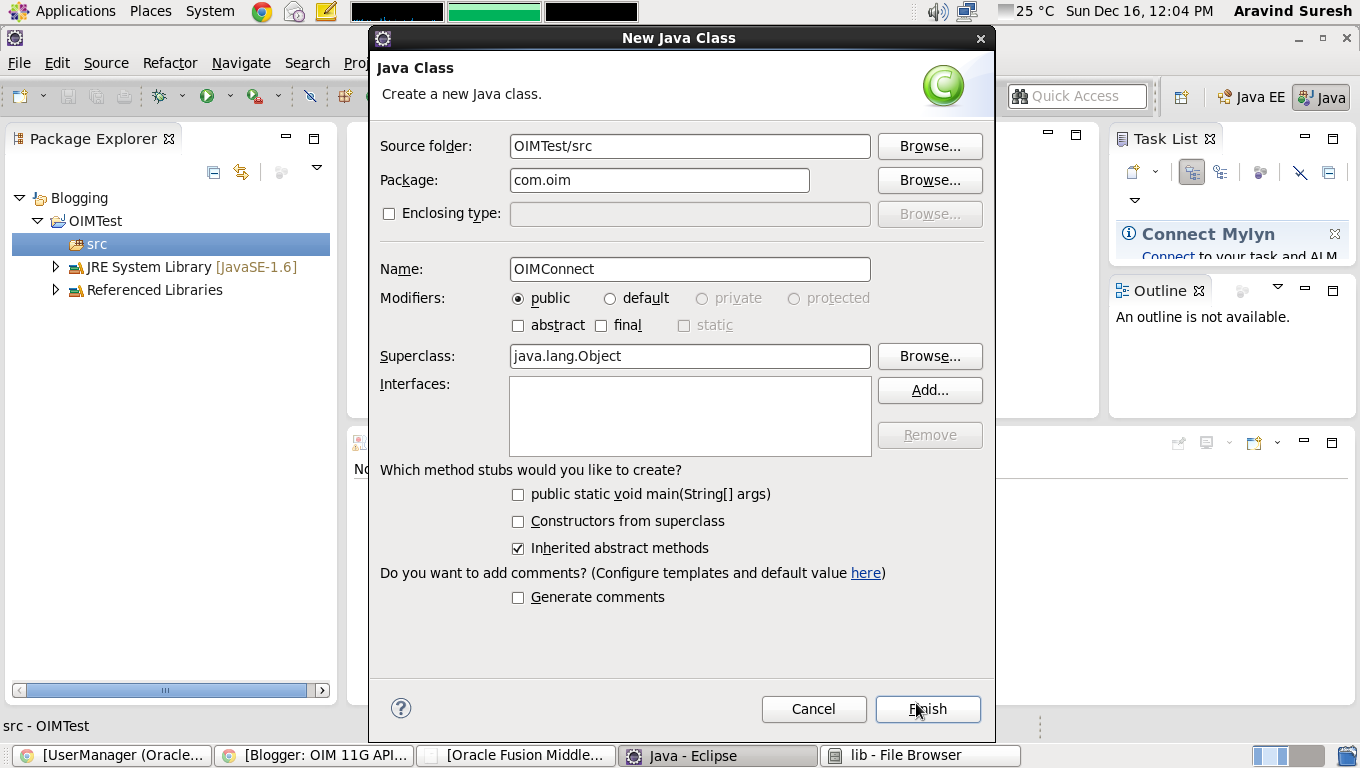
1) Creating a new Class for UserOperations


2) Writing code

package com.oim;
import oracle.iam.identity.exception.UserAlreadyExistsException;
import oracle.iam.identity.exception.UserCreateException;
import oracle.iam.identity.exception.ValidationFailedException;
import oracle.iam.identity.usermgmt.api.UserManager;
import oracle.iam.identity.usermgmt.vo.User;
import oracle.iam.platform.OIMClient;
import oracle.iam.platform.authz.exception.AccessDeniedException;

public class UserOperations {
public void createUser(OIMClient oimclient){
UserManager usrMgr = oimclient.getService(UserManager.class);
/*
* Mandatory fields are LastName, act_key, Role, Xellerate Type
*/
User user = new User(null); //Pass null while creating
user.setAttribute("First Name", "APIUser");
user.setAttribute("Last Name", "APIUser");
user.setAttribute("Email", "APIUser@mail.com");
user.setAttribute("act_key",1L); // Replace 1L with the organization key long value
user.setAttribute("Role","Full-Time");
user.setAttribute("Xellerate Type","End-User");
try {
usrMgr.create(user);
} catch (ValidationFailedException e) {
// TODO Auto-generated catch block
e.printStackTrace();
} catch (UserAlreadyExistsException e) {
// TODO Auto-generated catch block
e.printStackTrace();
} catch (UserCreateException e) {
// TODO Auto-generated catch block
e.printStackTrace();
} catch (AccessDeniedException e) {
// TODO Auto-generated catch block
e.printStackTrace();
}
}
public static void main(String[] args) {
OIMConnect conn = new OIMConnect();
conn.connect();
UserOperations userOps = new UserOperations();
userOps.createUser(conn.client);
conn.disconnect();
}
}
 3) Output

User is created in OIM.


4) Possible errors


  • oracle.iam.identity.exception.ValidationFailedException: IAM-3050028:The mandatory attributes act_key were not provided.:act_key
    • act_key has net been set as attribute in the User object
  • oracle.iam.identity.exception.ValidationFailedException: IAM-3050028:The mandatory attributes [Role, Last Name, Xellerate Type] were not provided.:[Role, Last Name, Xellerate Type]
    • Mandatory attributes have not be given values


Saturday, December 15, 2012

Starting with the basics : Connecting and disconnecting

Lets start with the first and foremost thing anybody who is looking to write OIM API code will require to know: Connecting to and disconnecting from the OIM server.

We will also take a look at how to setup our eclipse project for developing OIM API code.

So lets begin...

1) Creating an eclipse project.


2) Setting up the project with required libraries
  • Extract the oimclient.zip file present in the $OIM_CLIENT_HOME/server/client/
  • It will have a oimclient.jar and a lib, conf, sample folders within the extracted folder
  • Copy the wlfullclient.jar from the $WL_HOME/server/lib into the lib folder of the extracted oimclient.zip
    • If wlfullclient is not present in the $WL_HOME/server/lib folder, you have to build it manually using the follo\wing command
      • cd $WL_HOME/server/lib
      • java -jar wljarbuilder.jar
      • The wlfullclient.jar is created now
  • Copy the oimclient.jar and the contents of the lib folder of the extracted oimclient.zip, including the wlfullclient.jar


3) Writing code


package com.oim;
import java.util.Hashtable;
import javax.security.auth.login.LoginException;
import oracle.iam.platform.OIMClient;

public class OIMConnect {
OIMClient client;
public void connect(){
System.setProperty("java.security.auth.login.config","<oimclient.zip extracted folder>/config/authwl.conf");
Hashtable oimenv= new Hashtable();
oimenv.put(OIMClient.JAVA_NAMING_FACTORY_INITIAL,"weblogic.jndi.WLInitialContextFactory" );
oimenv.put(OIMClient.JAVA_NAMING_PROVIDER_URL,"t3://<host>:<port>");
client= new OIMClient(oimenv);
try {
client.login("<Username>", "<Password>".toCharArray());
System.out.println("Connected");
} catch (LoginException e) {
e.printStackTrace();
}
}
public void disconnect(){
client.logout();
System.out.println("Disconnected");
}
public static void main(String[] args) {
OIMConnect oimConn = new OIMConnect();
oimConn.connect();
oimConn.disconnect();
}
}

4) Running and testing

         Test results:
Connected   
Disconnected
5) Possible errors
  • javax.security.auth.login.LoginException: unable to find LoginModule class: weblogic.security.auth.login.UsernamePasswordLoginModule
    • wlfullclient.jar is missing in the buildpath
  • javax.security.auth.login.LoginException: java.net.ConnectException: t3://localhost:14000: Destination unreachable; nested exception is: 
    • java.net.ConnectException: Connection refused; No available router to destination
    • OIM server is not up and running
    • hostname or port may be wrong

  • Exception in thread "main" java.lang.SecurityException: /oracle/Middleware/Oracle_IDM1/server1/config/authwl.conf (No such file or directory)
    • at com.sun.security.auth.login.ConfigFile.<init>(ConfigFile.java:110)
    • Wrong path specified for the authwl.conf file